 Quality Review
 Meet the Q&PS Team
 MedicASK Answers
 MedicASK Answers Full List
 Patient Safety Incident Report
 Loss or theft of controlled substances
 MedicASK
 Files

Latest MedicNEWS
[widgetkit id="53"]
- Hits: 2885
Password Reset / Change
If you are directed to the Password change page, you MUST ENTER YOUR CURRENT PASSWORD. The Current password field may appear to be automatically filled in and have a green check mark, however you MUST MANUALLY ENTER YOUR CURRENT PASSWORD.
When the reset is successful there will be a message letting you know the reset was a success. If you did not see this message your current password was not entered correctly.

When logging in to the Regional Paramedic Program website, your account will give you access to MedicLEARN as well as MedicNET using Single Sign-On.
If you are having difficulties logging in please have a look at our help page.

If you are unable to log on to the website, we have a few tips that may help you to fix that.
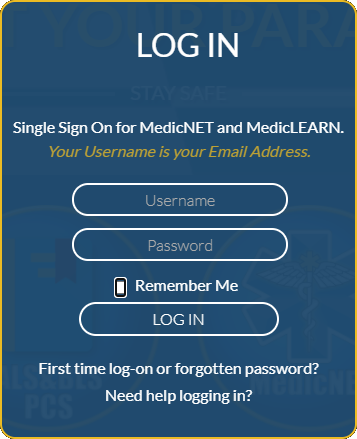
Your login ID is your email address. This is typically your service email, if you are with multiple services all email addresses will work. If you have added a personal email to your profile in MedicNET that email address will also allow you to log on.
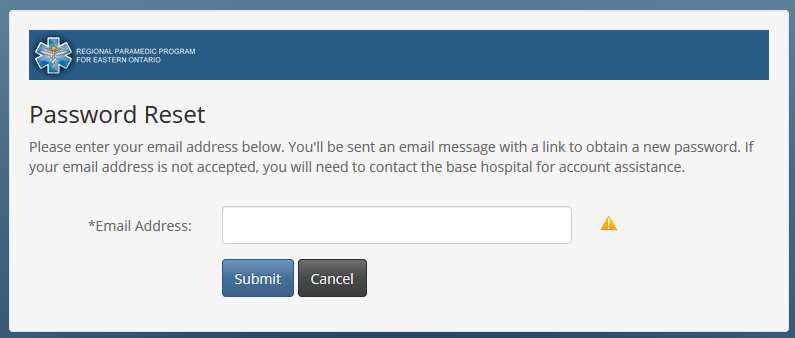
New users must click the link in the log on pop up that says "First time log-on or forgotten password?". This link is used to setup your log on password. When you click the link you will be directed to MedicNET. Enter your email address. If you see a green check mark, your email is valid in the system.
When you click submit an email will be sent to the address you entered. The password reset link is only valid for two (2) hours. If you are unable to complete the password reset in that time you will need to repeat the process.
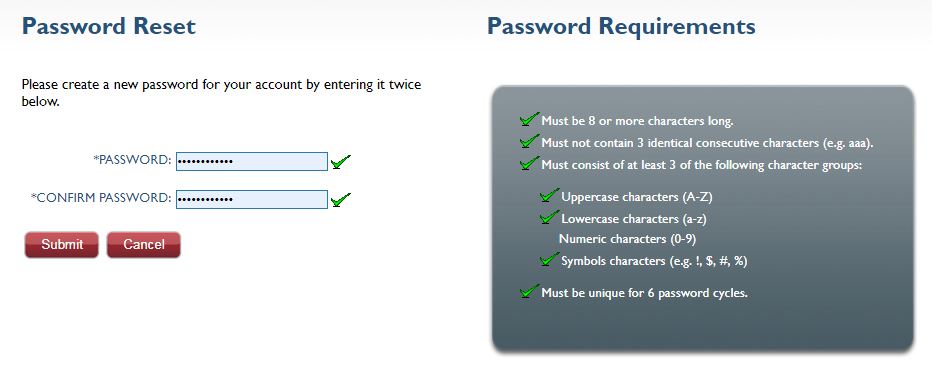
The rules for your password will be shown to the right. As you enter your password and meet the various rules the corisponding rule will show a green check mark to show that you have met the requirement. Once all rules have been maked as met you can submit your password change.
If you have been directed to the page to update your password and see the CURRENT PASSWORD field, you MUST ENTER YOUR PASSWORD even though it may show ******** and have a green check mark
If you have tried all email addresses and do not see a green check mark, please contact the RPPEO so we can resolve the issue for you.
If your email address was valid but you are not receiving the email, check your Junk, Spam, Trash and Deleted folders for the email account you entered when requesting a password reset. If no email is received with in 10 minutes please contact us so we can assist.
Watch the Video

Guidance Document: Document #: CS-GD-005
Published by authority of the Minister of Health
Purpose
This document provides guidance to regulated parties and exemptees under the Controlled Drugs and Substances Act (CDSA), the Cannabis Act (CA) and their regulations in completing a Loss or Theft Report form for controlled substances, precursors and cannabis.
Regulated parties and exemptees must notify the Minister of the loss or theft of controlled substances in accordance with the relevant regulations or the conditions of their exemption. Such notification must be submitted to Health Canada, Office of Controlled Substances (OCS) using the Loss or Theft Report Form for Controlled Substances, Precursors and Cannabis (CS-FRM-011).
Read more …Loss or theft of controlled substances

SCORM
A special Thank You to the Ottawa Heart Institute for providing clarity and information regarding LVAD patients' treatment and transport.
Please Note: Some information that is suggested in the YouTube links within the presentation may not follow the recommendations by the Ottawa Heart Institute and the RPPEO. These videos are for information only. Follow the guidance outlined in the main presentation regarding LVADs.

If you would like more information regarding LVADs, have a look at the videos below
Thank You to the Ottawa Paramedic Service for providing these videos.
Please note: In this second half, the presenter mentions cardioversion for arrhythmia conversion using Anterior-Posterior pad placement in hospital. Our Medical Director's recommendation for defibrillation and/or cardioversion in the pre-hospital environment is Anterior-Lateral positioning, to further protect the LVAD pump.
The Advanced Life Support Patient Care Standards outline the requirements for paramedic annual maintenance of certification in Section 5.
In brief, paramedics need 10 patient contacts each year as well as no more than 90 consecutive days without providing documented patient care. Those who have more than 90 days away from 911 patient care may undergo a Return to Clinical Practice to maintain or reinstate their Certification.
In addition to the requirements set out in the Patient Care Standards, the RPPEO requires the following each year:
Each Advanced Care Paramedic (ACP) must:
Each Primary Care Paramedic (PCP) must:
The RPPEO Certification Year runs from February 1 through January 31. Each paramedic must complete annual maintenance of certification requirements by the end of the day of January 31 each year.
For more details, see the RPPEO Certification Policy below.
|
CERT 100 Certification.pdf
Popular |

At the RPPEO, the annual certification period begins on February 1 at 00:00hrs.
Paramedics must meet minimum annual requirements, as set out in the Provincial Maintenance of Certification Standards (MoCS) outlined in Appendix 6 of the Ontario Advanced Life Support Patient Care Standards (ALS PCS) (see below).
The RPPEO examines each paramedic’s record to be sure that they’ve completed the minimum requirements for re-certification. If minimum requirements are met, the paramedic receives a certification letter on February 1 indicating their authorized scope of practice for the coming certification year.
If the minimum requirements are not met, the paramedic is deactivated and receives such notice. Deactivation for any reason means that the paramedic is not authorized to practice until the issues identified are corrected.
Paramedics who fail to meet the minimum requirements for annual recertification at the end of the annual certification period will be deactivated at the beginning of the next certification period, the 1st of February at 00:00hrs.

From Appendix 6 of the Ontario Advanced Life Support Patient Care Standards:
If you have any questions about annual Maintenance of Certification, please contact certification@rppeo.ca or contact the MedicLINE at 1-877-587-7736 x1
Read more …Maintenance of Paramedic Certification


The My OBH Collaboration is a technology working group that's created three platforms to support the key functions of a base hospital: MedicASK to support the delegation of controlled medical acts, MedicLEARN for continuing education, and MedicNET for certification. These platforms are secure, password protected and are accessible by not only the individual base hospital, but to their respective paramedic services, their paramedics and their Ministry of Health representative.
We've also developed other behind-the-scenes tools that contribute to continuous quality improvement.
In January 2019, we began a renewed formal information technology collaboration among the four collaborating base hospitals: Hamilton Health Sciences - Centre for Paramedic Education and Research, Lakeridge Health - Central East Prehospital Care Program, Ottawa Hospital Regional Paramedic Program for Eastern Ontario, and Thunder Bay Regional Health Sciences Centre - Northwest Region Prehospital Care Program. We share the vision that better data tools will help our base hospitals improve paramedic care. With better tools, we will be able to better collect, analyze, report and use data in our programs. Our partners and stakeholders will be able to see that data is contributing to better-informed decisions for patient safety and quality.
The MedicX suite of services developed by RPPEO's IT Team, provides online password protected access to tools for paramedics in the RPPEO catchment. These tools enable self-access for paramedics managing their clinical portfolios and engaging with the RPPEO.

MedicNET
MedicNET is your portal to manage and review current status as a certified Paramedic under the RPPEO.

MedicLEARN
Keep your clinical knowledge and skills up to date by enrolling in online learning. Earn credits toward your annual maintenenace of certification.

MedicASK
MedicASK is your opportunity to share your questions about clinical issues and get answers. We take your questions seriously as they often help us shape and improve existing practices and procedures.

MedicNEWS
Engage with the latest RPPEO paramedicine news, be the first to know about upcoming training, and more get insight behinf the scenes. The RPPEO releases paramedic news and info in electronic newsletters 10 times a year.

MedicLINE
The Regional Paramedic Program for Eastern Ontario maintains a dedicated toll-free telephone line for our paramedics called MedicLINE. This service provides paramedics within the region the opportunity to ask questions and discuss issues with an RPPEO coordinator in a timely way. MedicLINE is for those who are looking for advice on more complex issues or pressing situations, as well as those who wish to speak with someone rather than emailing.
When calling, we ask paramedics to leave a detailed voicemail with your name, OASIS number, a callback number, and a brief reason for your call. If we are unable to answer your call right away, a coordinator will contact you promptly, often within a few minutes and always by the next business day.

MedicX Suite of Purpose Built Software for Paramedics
Since 2009, the RPPEO in collaboration with our partner services and regional bases hospitals across Ontario, has developed the MedicX suite of applications. MedicX apps enable paramedics to have easier access to useful tools and information.

Medical Advisories are used to notify paramedics in our region of safety concerns or evolving clinical situations that require rapid information or guidance from the regional Medical Director.