Enter your search

Results will be displayed to the left.

Uncategorised

Certification

Certification is the means by which the Medical Director may authorize a paramedic to perform specific delegated controlled medical acts.

Certification to Practice

  • Certification for Ontario Candidates to work as Paramedics

    Once you’ve graduated from a recognized paramedic program in Ontario, you may apply to the Ministry of Health for your AEMCA or ACP certificate. With one of these certificates, you may apply for work as a paramedic at Ontario paramedic services.

    In Ontario, every person who wishes to practice as a paramedic must be employed by a paramedic service. Once you have secured an employment offer, the paramedic service will request certification.

    To practice as a paramedic in Eastern Ontario, Primary Care or Advanced Care Paramedics must be certified by the RPPEO.

    If you change your level of competency, you will need to be certified in the new level before you begin using that scope of practice. A PCP who has trained as an ACP needs ACP certification before using the ACP scope of practice.

    The RPPEO’s certification process for both PCP and ACP scopes of practice uses scenarios to test a paramedic’s knowledge and skills.

    Once you successfully complete the RPPEO’s certification process, you will receive a Letter of Certification. This letter details the delegated controlled medical acts that the medical director authorizes you to use.

    CERTIFICATION REQUEST FORM FOR PARAMEDIC SERVICES

  • Certification of Paramedics in training

    Paramedics in training who wish to undertake Delegated Medical Acts during preceptorship may be able to do so if their academic institution sponsors them in the Academic Certification process. Upon receipt of the college's request and with the agreement of the host paramedic service, the RPPEO may certify paramedics in training. Paramedics who receive this academic certification are supervised by a qualitied RPPEO certified paramedic. This is a special Academic Certification for training purposes for both PCP and ACP scopes of practice.

    A college may request Academic Certification on behalf of a paramedic using the form below.

    Certification Request Form for Colleges

  • Cross certification within Ontario

    Paramedics currently certified by another Base Hospital in Ontario may apply for certification in Eastern Ontario through the Cross-Certification process. The RPPEO understands that training, skills and continuing education are quite similar across the province. The Provincial Patient Care Standards apply throughout Ontario. Paramedics already practicing elsewhere in Ontario may benefit from an expedited cross-certification if they wish to work for a paramedic service in the RPPEO’s coverage area. 

    Cross Certification Referral Form

  • Certifying in Eastern Ontario from elsewhere in Canada or from abroad (Labour mobility)

    Paramedics who are licensed outside of Ontario must use the Ministry of Health’s Paramedic Equivalency Process in order to apply for an Ontario AEMCA or ACP certificate. Once you have obtained the certificate, if an employer in Eastern Ontario offers you employment you will enter the same certification process with the RPPEO as other paramedics at the PCP or ACP level.

    Labour Mobility and Equivalency in Ontario

Read more …Certification

  • Hits: 15800

Certification Process

CERTIFICATION AT THE RPPEO INCLUDES 3 DIVISIONS

Entry to Practice

Is the process by which a candidate can become certified to practice as a Paramedic in eastern Ontario.


Return to Clinical Practice

Is the process by which a Paramedic that has been away from active practice become re-activated.


Continuing Practice

Is the process by which the RPPEO fulfills its mandate for patient safety by evaluating active Paramedics for continuing competency.


CERTIFICATION REQUIREMENTS

The Provincial Maintenance of Certification Standards (MoCS) are outlined in Appendix 6 of the Ontario Advanced Life Support Patient Care Standards (ALS PCS). Paramedics who fail to meet the minimum requirements for annual recertification at the end of the annual certification period will be deactivated on the 1st of February at 00:00hrs (beginning of the next certification period).

THE CRITERIA FOR ANNUAL RECERTIFICATION ARE:

Recertification requirements are set and maintained by the Ministry of Health and Long-Term Care's Emergency Health Services Branch. They are listed in the Advanced Life Support Patient Care Standards (ALS PCS), Appendix 6 which states:

Maintenance of Certification requires that the Paramedic:

  1. The Paramedic shall demonstrate competency in the performance of Controlled Acts and other advanced medical procedures, compliance with the ALS PCS, and the provision of patient care at the Paramedic’s level of Certification. Competency and compliance shall be determined by the Medical Director and may include chart audits, field evaluations, and RBHP patch communication review.
  2. The Paramedic shall not have an absence from providing patient care that exceeds ninety (90) consecutive days.
  3. The Paramedic shall either,
    a. provide patient care to a minimum of ten (10) patients per year whose care requires assessment and management at the Paramedic’s level of Certification, or
    b. where a Paramedic is unable to assess and manage the minimum of ten (10) patients per year, demonstrate alternate experience, as approved by the Medical Director, that may involve 1 or more of the following:  
    i. other patient care activities; 
    ii. additional CME; 
    iii. simulated patient encounters; and
    iv. clinical placements.
  4. The Paramedic shall complete at least 1 evaluation per year at the appropriate level of Certification, which may include: an assessment of knowledge and evaluation of skills; scenarios; and on-line learning and evaluation.
  5. The Paramedic shall complete a minimum of CME hours per year as follows: eight (8) hours for PCPs, twelve (12) hours for PCP Flight, twenty-four (24) hours for ACPs, and seventy-two (72) hours for ACP Flight and CCP. CME hours include electives from our approved elective calendar, as well as CME hours, include hours completed as part of an evaluation required by paragraph 4.

TO BE RECERTIFIED WITH THE RPPEO THIS YEAR:

Each Advanced Care Paramedic (ACP) must:

  • Be employed by an Emergency Medical Service/Paramedic Service
  • Provided patient care to a minimum of ten (10) patients per year whose care requires assessment and management at the Paramedic’s level of Certification
  • Have participated in Cycle 1 and Cycle 2 CME
  • Have 8 hours of an elective from our approved elective calendar, or that the Paramedic submits for approval via our Elective CME Pre-approval request form.

Each Primary Care Paramedic (PCP) must:

  • Be employed by an Emergency Medical Service/Paramedic Service
  • Provided patient care to a minimum of ten (10) patients per year whose care requires assessment and management at the Paramedic’s level of Certification
  • Have participated in Cycle 2 CME

If you have any questions about these requirements, please contact certification@rppeo.ca or contact the MedicLINE at 1-877-587-7736 x1
Read more …Certification Process

  • Hits: 4104

Classroom Content Help

Editing page content

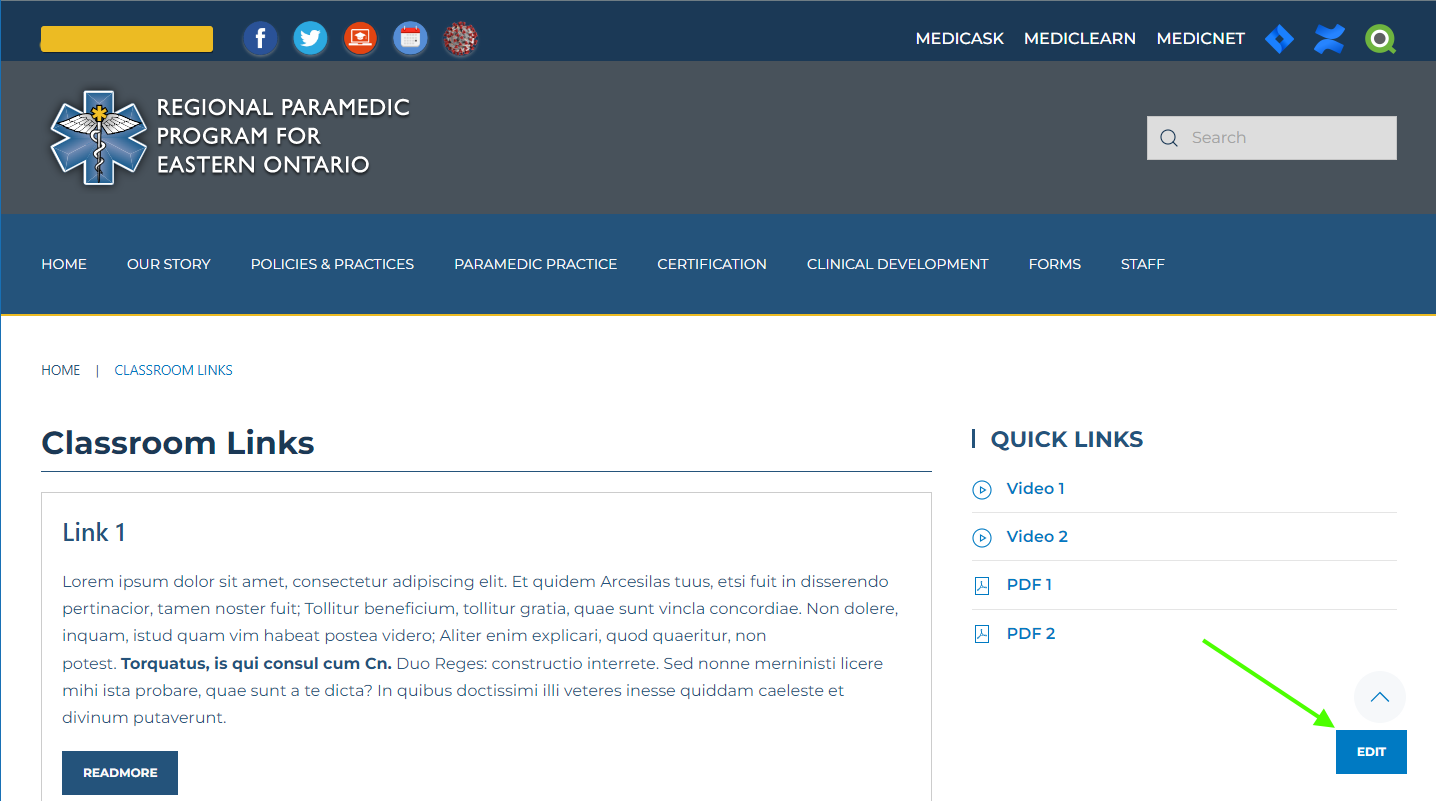
  • Edit the Classroom Links page

    When you are logged in there will be an Edit button available at the bottom of the page. If the edit button is not displayed, the editor is already open by someone else.

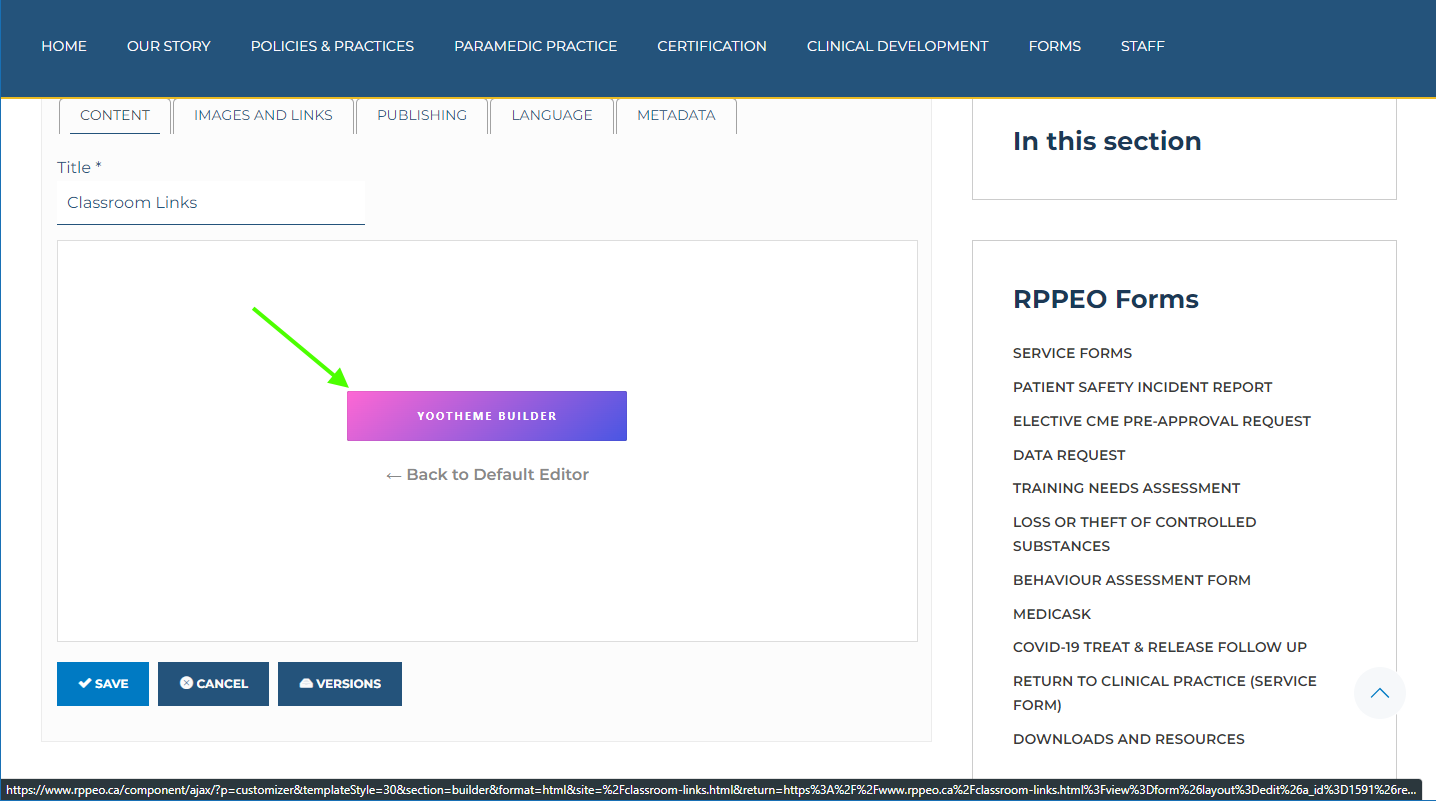
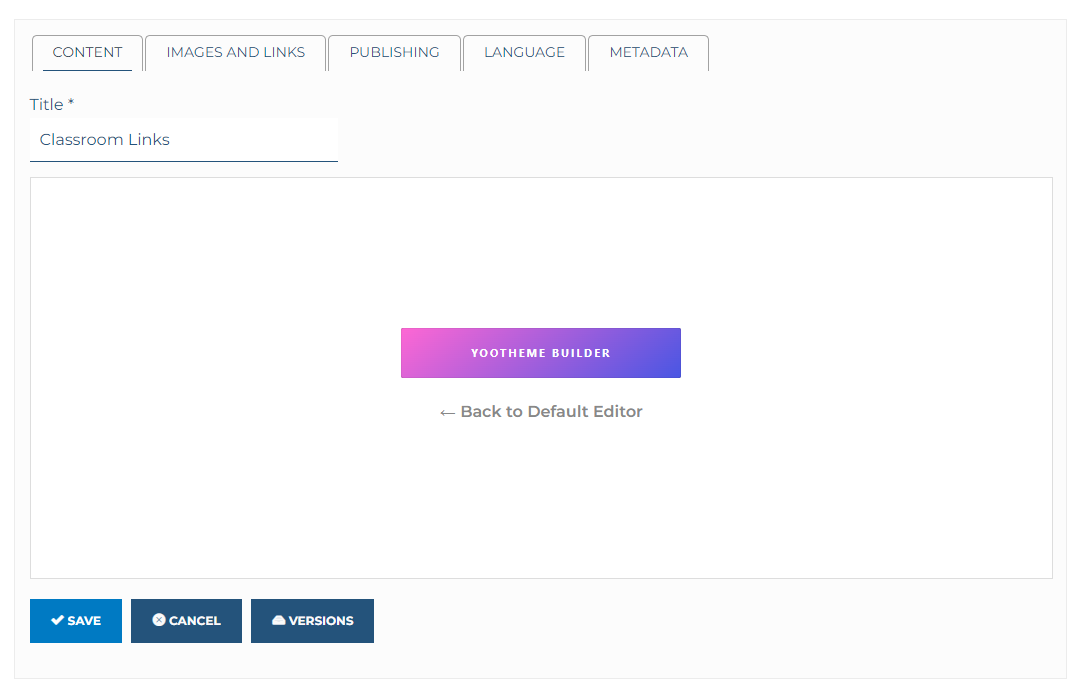
  • Open the Yootheme Builder

    The Joomla atricle editor will open, however there will be a button where the article would normally be that says Yootheme Builder. Click this button.

  • Select the Module to Edit

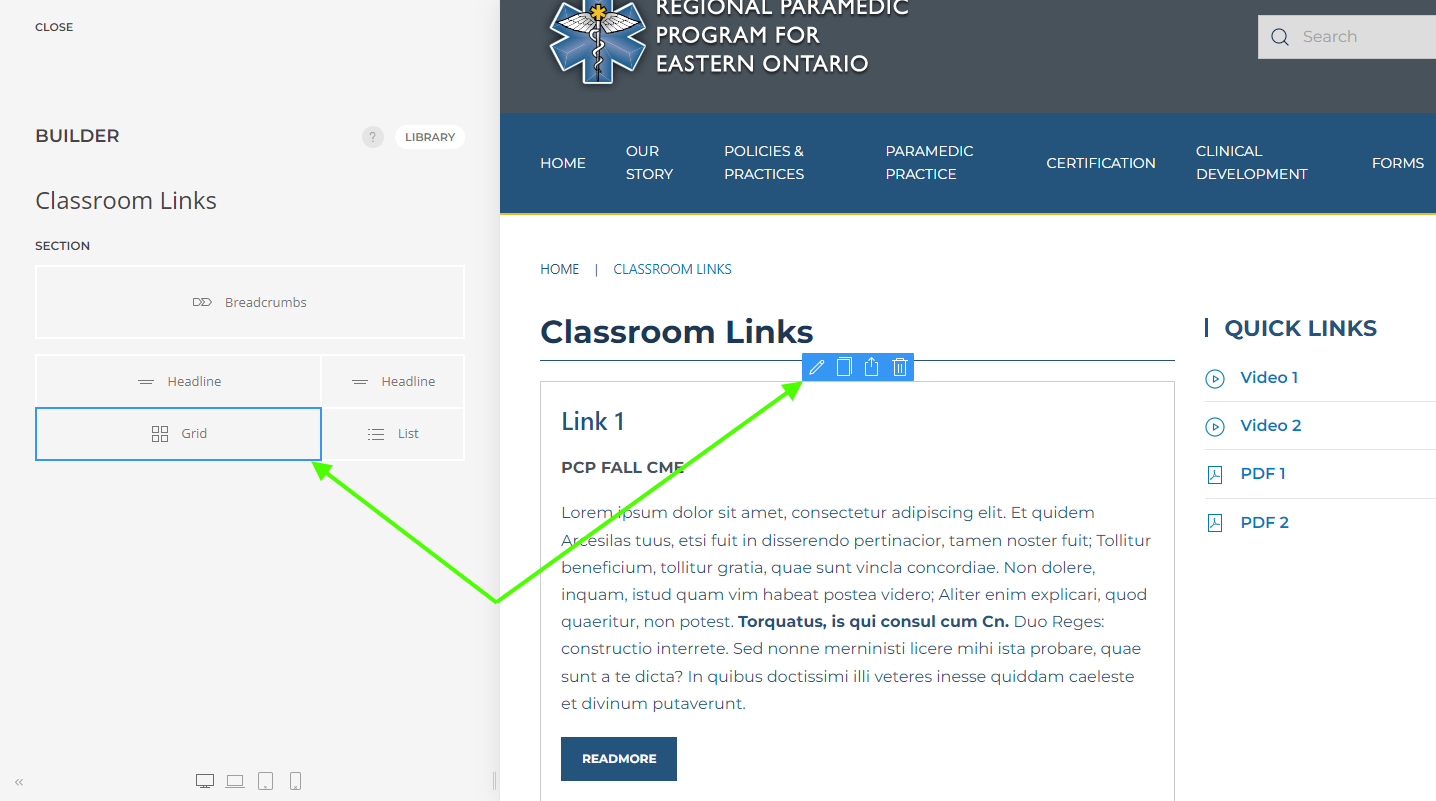
    The grid module is used to create the list of content. The layout is very flexable and can be adjusted as needed.

    To edit the grid, click on the grid from the left hand side, or by hovering over the module and clicking the edit icon.

  • Edit the Grid

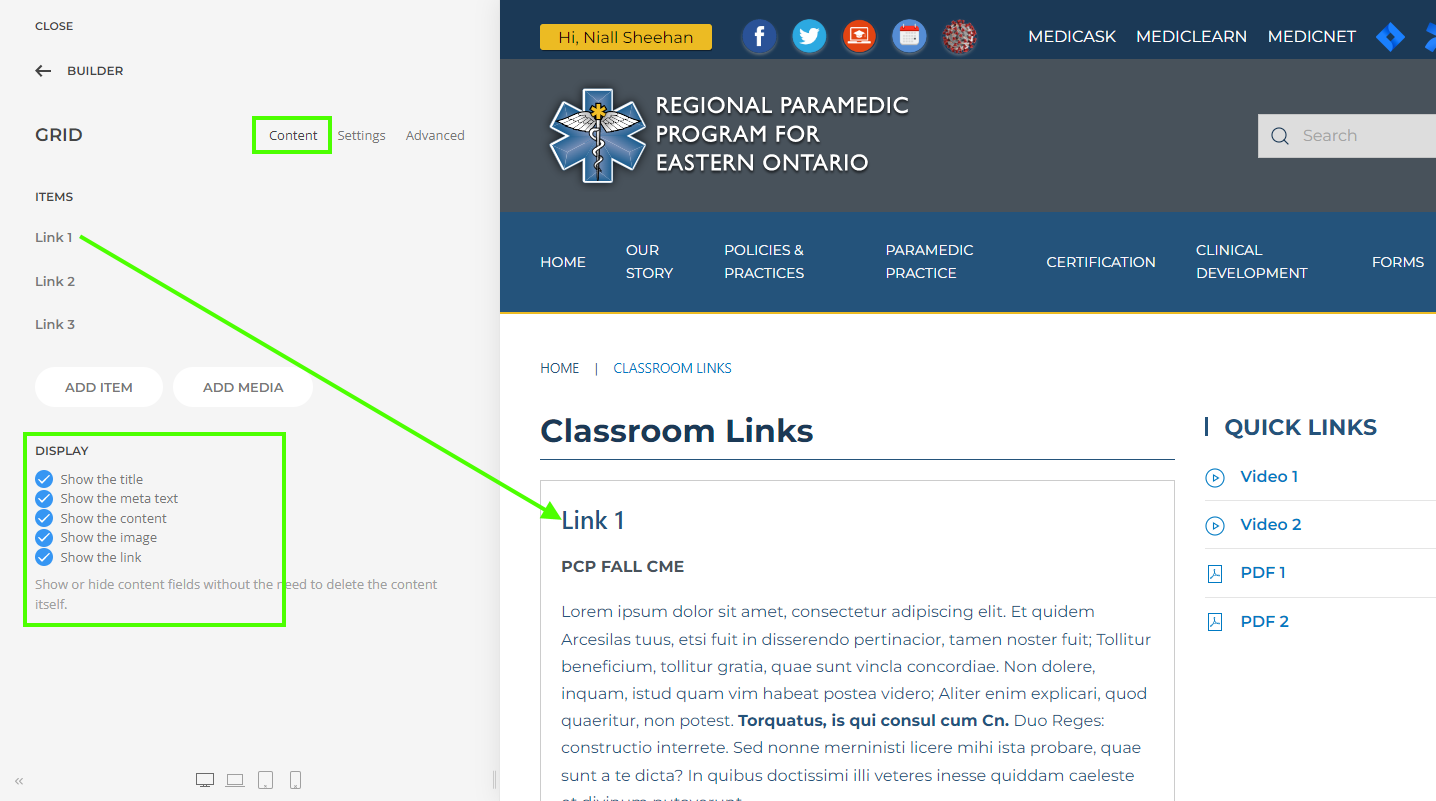
    When the grid element has been seleced you will see the Content options for the grid. You can adjust the ordering by draging items up/down, add new items, edit, duplicate or delete existing items.

    On main grid page you can also decide with itmes to display or hide. By default all are displayed.

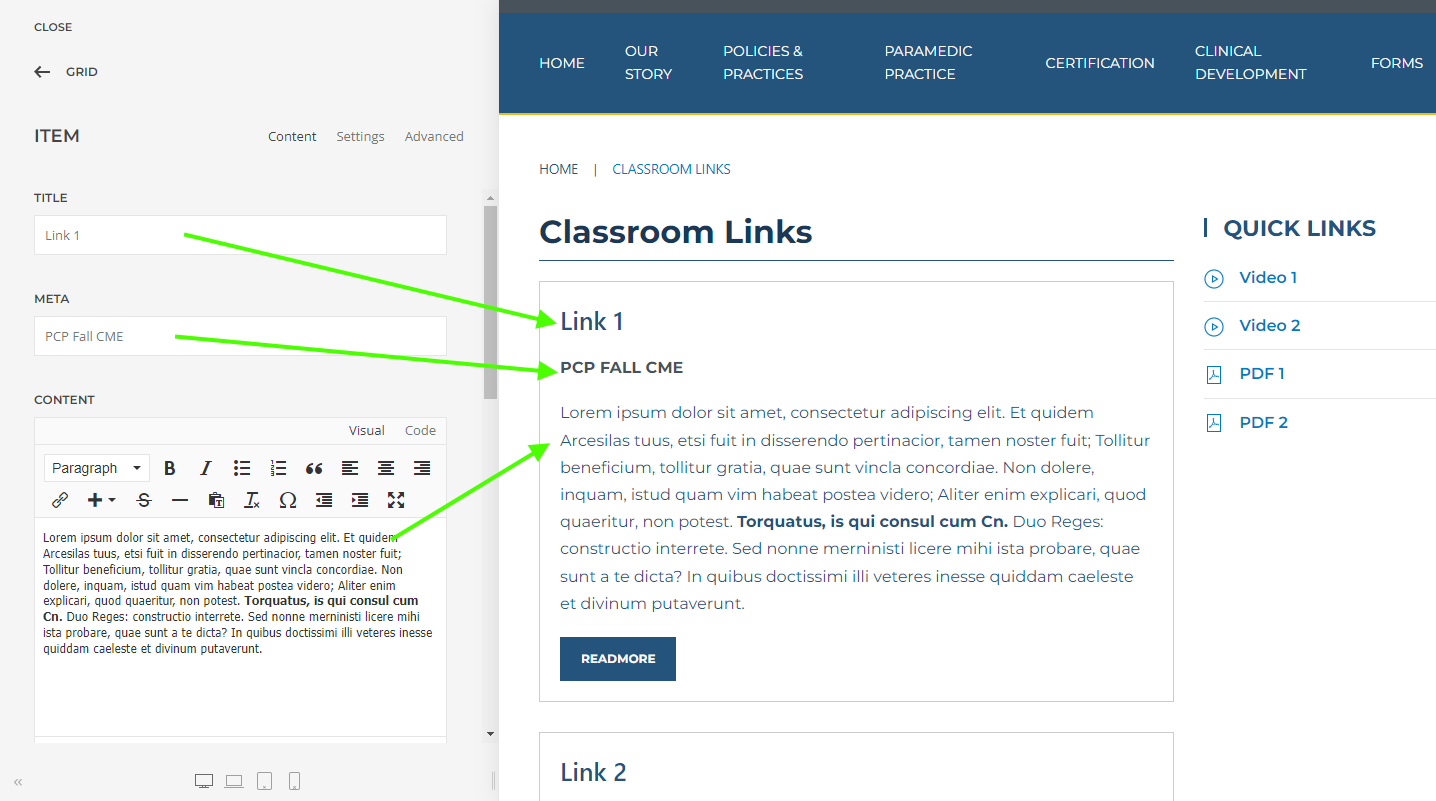
  • Editing Grid Content

    Each panel in a grid has a Title, Meta, Content, Image, Link, Link Text. It is best to maintain a consist ant style within a grid layout. If a second grid, or another type of content is required additional elements can be added to the page.

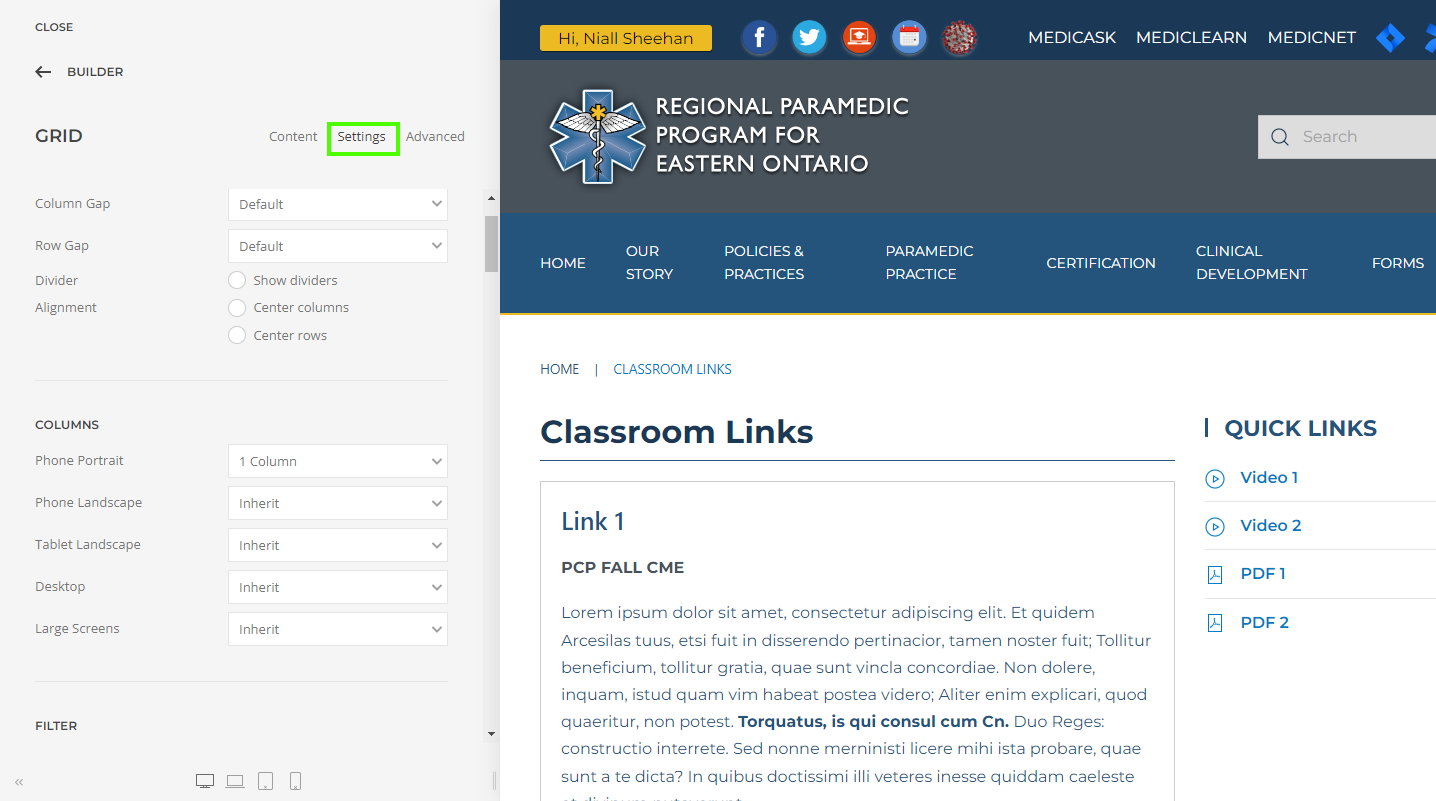
  • Adjusting the Grid Settings

    The setting tab allows you to adjust the grid layout. You can adjust the number of columns, the panel style, and how all of the various element of the grid module are displayed.

  • Finish Editing

    When you have completed your changes to the page, the Save Layout button, saves the Yootheme Pro changes to the page.

    When  you click CLOSE you are returned to the Joomla articel editing layout. DO NOT navigate away from this page without clicking SAVE or CANCEL. When you forget to SVE or CANCEL before leaving this page, the content will be LOCKED and only you will be able to reopen the article. 

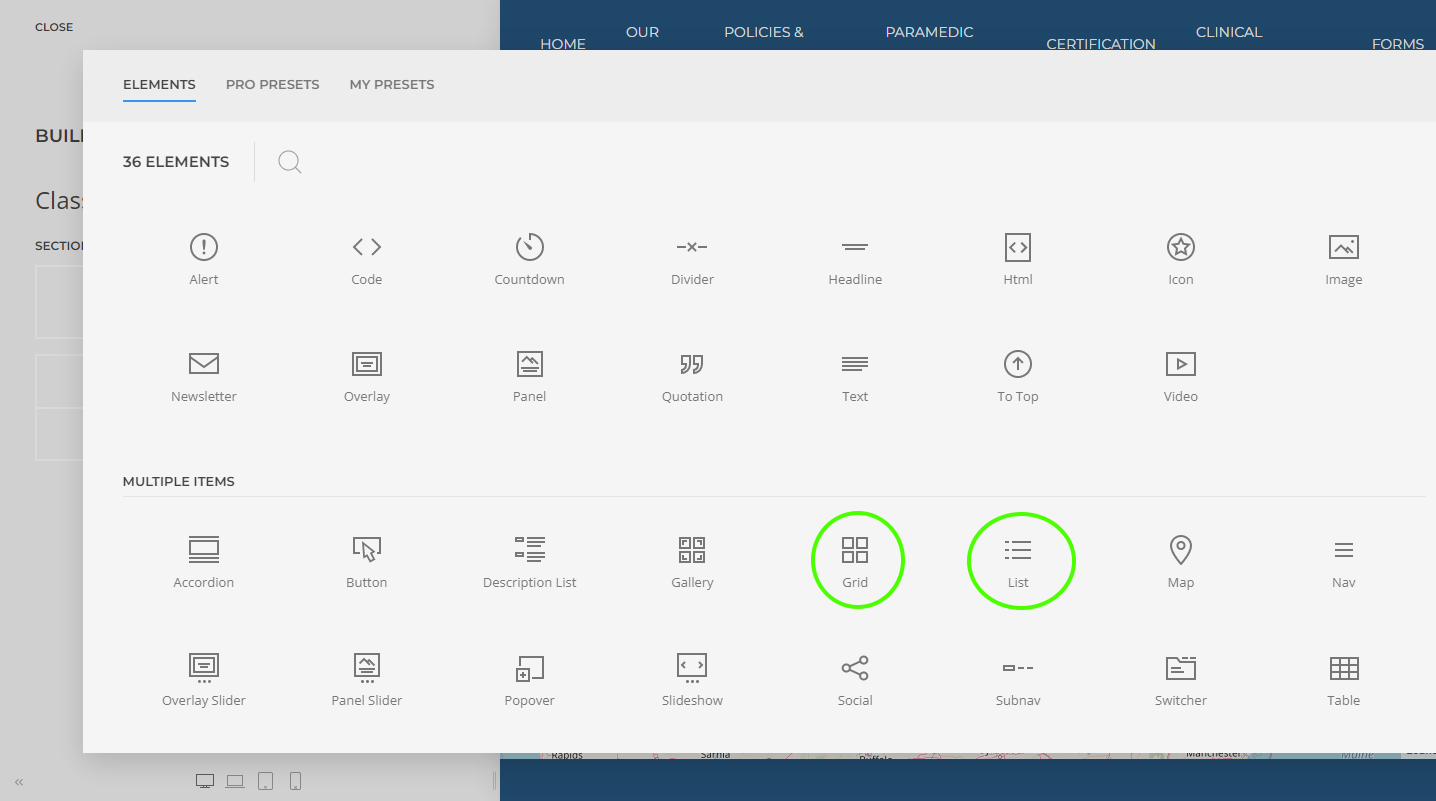
  • Grid Elements (Modules)

    There are many useful element/modules that can be added to a page. The Grid, List, and Panel modules are the most useful to quickly setup and display content. 

    Please do not add new sections or edit the existing section, column, etc. If additional layout changes are required please contact Niall Sheehan as these steps are beyond the scope of this How-to. 

Uploading and managing files

Files that are to be available for Students to download should be placed in the RSFiles Folder Classroom Files.
[https://www.rppeo.ca/manage-files-long]

File names should be concise, for example, STATION1-CSV.pdf.

If a file update is required, the new file's name MUST match the name of the existing file. Each Station will be outfitted with a QR Code that the student can use to directly download the file to their phone/tablet.

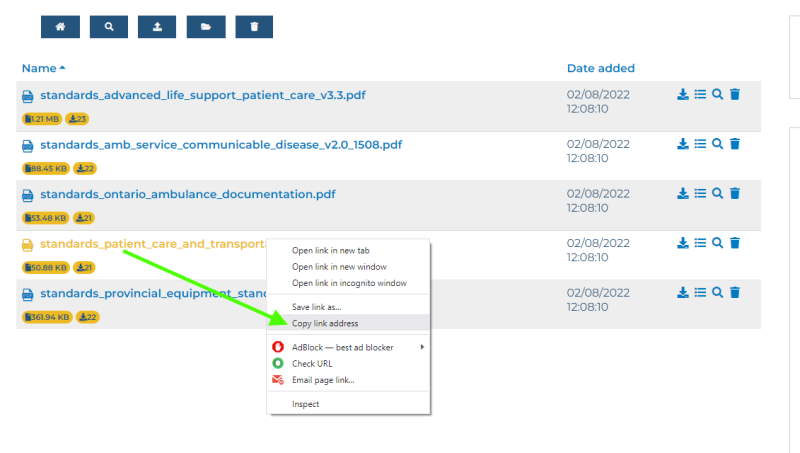
classroom files copy link

To copy the path required to create the QR Code, locate the file on the Files Download page > Right Click the file and select Copy Link.

Upload Files

To upload a file click the Upload Icon.

classroom files upload

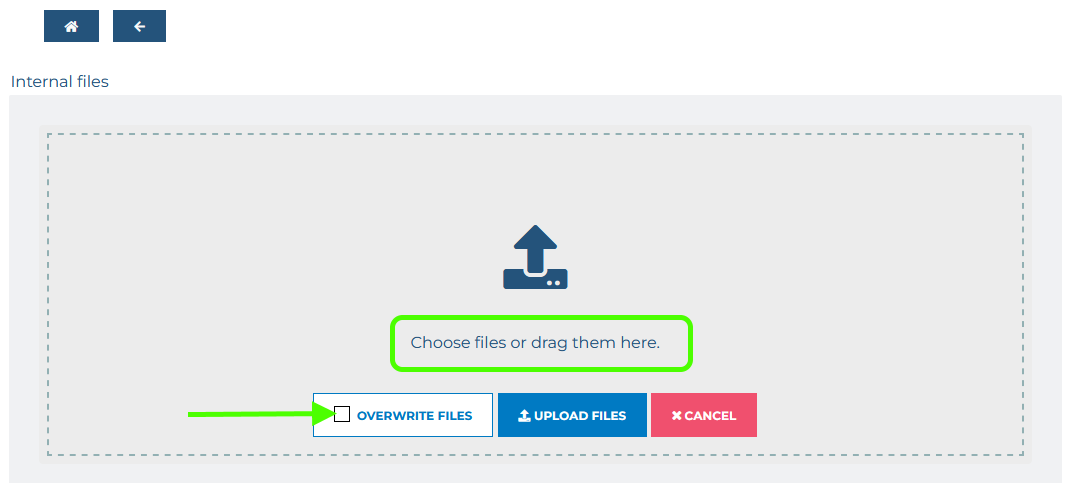
This will open the File Upload Page. Click the text to browse for a file, or drag and drop the file on to this window.

classroom files upload2

If you are uploading a new version of an existing file the filename MUST BE EXACTLY THE SAME as the previous version, to allow the website to Overwrite the existing file click the checkbox to overwrite existing files.

Edit Files

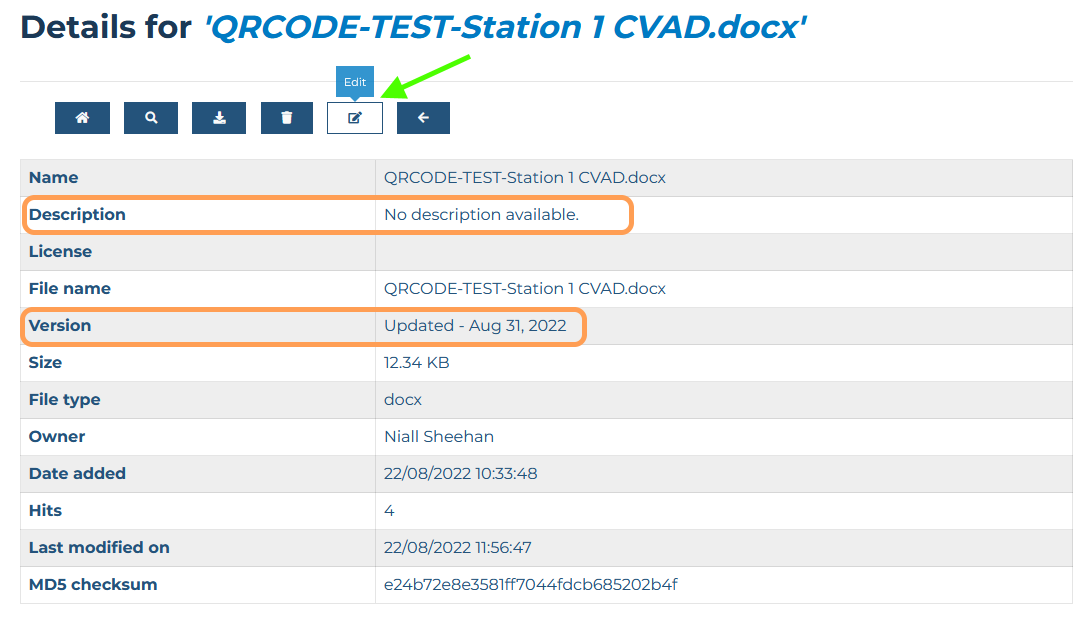
Once the file has been uploaded, additional information can be added to make it easier to identify and maintain files as well as gather statistics.

classroom files details2

The description and version can be helpful for identifying files and when they were last modified.

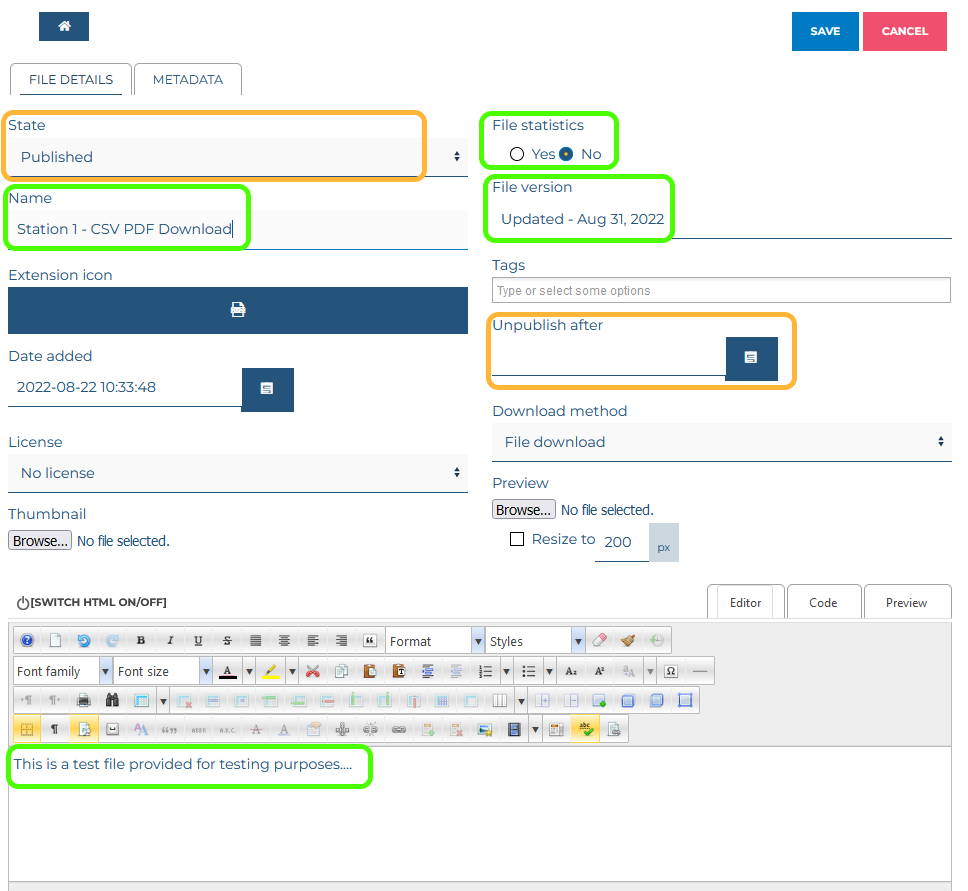
The following fields may also be helpful

classroom files edit

Name: A human friendly Filename that is displayed instead of the actual filename.
File Statistics: Will collect download data
Details: The large textbox can be used to provide additional information when viewing the file details
Unpublish Date: The date to remove the file from the list of available files.

qrcode-station1-cvs

Creating QR Codes

Use your phone to scan and test this link.

QR Codes are scannable images that link to a specific URL.

To generate a QR Code, you will need the URL to a page, file, or other resource. Go to QRbot.net and paste the link into the URL filed and save the QR Code image. If the QR Code is going to be used for printing save a large version of the code.

If a file that has been saved to the Classroom Files folder needs to be updated, the existing file must be deleted and the new file must have EXACTLY the same filename for the QR Code to continue to work as needed.

The QR Code above represents the link:
https://www.rppeo.ca/manage-files-long/download-file.html?path=QRCODE-TEST-Station%2B1%2BCVAD.docx

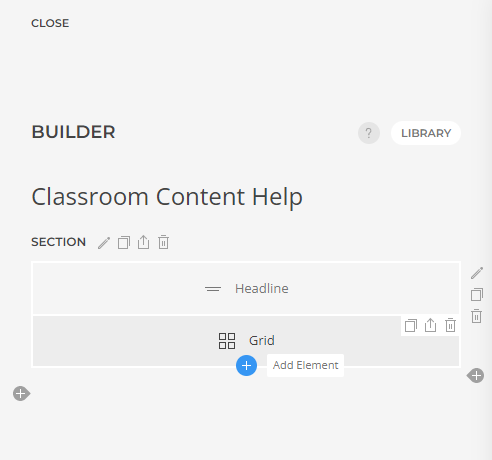
  • Add an Element (Module)

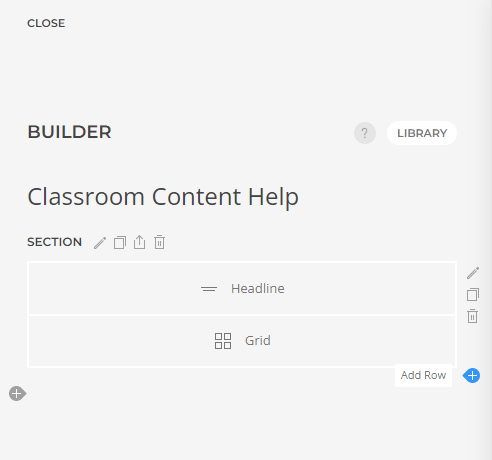
  • Add a row

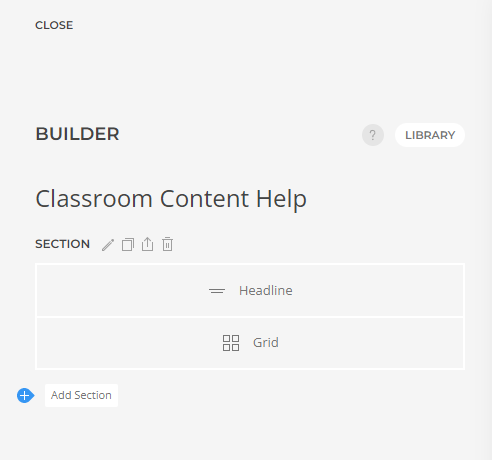
  • Add a Section

Read more …Classroom Content Help

  • Hits: 3273

Classroom Links

2025 Fall CME In-Person Activities

  • History Taking & Advanced Assessments

    In the prehospital setting, effective history taking and advanced assessments are vital to delivering safe, timely, and informed care. Paramedics often encounter patients in dynamic and unpredictable environments, where quick, accurate decisions can significantly impact outcomes. By skillfully gathering a focused history and performing a structured assessment, paramedics can identify life-threatening conditions, recognize subtle clinical cues, and initiate appropriate interventions before hospital arrival. These skills are the backbone of professional judgement and patient-centered paramedicine.

  • Medication Safety and Usage

    In the high-pressure world of prehospital care, medication safety and proper usage are critical responsibilities for every paramedic. Administering the right drug, at the right dose, to the right patient requires not only clinical knowledge but also vigilance and sound decision-making. From managing high-risk medications to recognizing potential contraindications and interactions, paramedics must apply pharmacological principles with precision and care. A strong foundation in medication safety not only protects patients but reinforces the trust placed in paramedics as autonomous, frontline clinicians.

  • Emergency Childbirth

    Emergency childbirth presents one of the most high-stakes and unpredictable challenges in paramedicine. When seconds count and there’s no time to reach a hospital, paramedics must be prepared to manage labour, delivery, and potential complications with skill and composure. From recognizing imminent birth to supporting both mother and newborn, the ability to remain calm, follow clinical guidelines, and adapt to evolving circumstances is essential. Providing safe, confident care during out-of-hospital deliveries reinforces the paramedic’s vital role in safeguarding life at its very beginning.

    Skill Videos

  • Newborn Resuscitation

    Newborn resuscitation is a rare but critical event that demands swift action, precision, and confidence from paramedics. In the moments following birth, a newborn’s transition to independent breathing can be unpredictable, and prompt intervention can mean the difference between life and death. Paramedics must be equipped with the knowledge and skills to assess newborn status, initiate effective ventilation, and provide life-saving support when required. Mastery of newborn resuscitation protocols ensures that paramedics are ready to act decisively when every second counts.

Questionnaire

Please take a moment and fill out our CME Survey!  We want to hear from you and build better CME experiences in the future!

Scan the QR code with your smartphone, or click the link below.

Click here for the In-Class survey.

Read more …Classroom Links

  • Hits: 15144

Clinical Development

As paramedic practice becomes increasingly professionalized, paramedics are becoming more responsible for integrating skills and knowledge. Continuing education is an essential aspect of the fast-moving, specialized care that paramedics provide.

Continuing Medical Education

At the RPPEO, we use two annual "core" CME blocks to provide practise, knowledge and training for paramedics. The Spring CME period begins early in April each year and closes in June. It's meant to provide 8 hours of structured education for paramedics. While this represents a mandatory education event for ACPs, Primary Care Paramedics can also attend and we include PCP content. Fall CME begins in September and runs until January of the next year, offering 8 hours of education to both Primary Care and Advanced Care Paramedics.

The RPPEO uses principles of adult learning  to make engaging interactive curriculum for paramedic core CME. We quickly switched to online only learning in 2020 with the advent of the pandemic. It's been challenging to offer interesting, fun and useful learning that meets paramedic needs, but we're committed to making it better and better!

Elective CME

The RPPEO provides many elective CME opportunities for PCP and ACP clinicians, often through recognizing the educational content of specialized courses, workshops and conferences.

When we're assessing content for electives, we look at how the educational event relates to the 6 integrated roles of the Paramedic: clinician, professional, educator, advocate, team member, and reflective practitioner. In fact, we use this concept of the interconnected roles of the Paramedic in all of our educational planning and development.

ACPs require 8 hours of elective CME annually. The RPPEO encourages PCPs to use elective educational opportunities to round out their clinical development each year.

Excellence Highlight

Adult continuing clinical education for paramedics

We've partnered with St. Francis Xavier University to provide adult education courses to our staff to ensure we're creating the best learning opportunities for paramedics. ​

The Education team works increasingly in lock-step with our Quality & Patient Safety department. This way, we'll be able to identify clinical issues that would benefit from educational intervention and examine whether our education made a difference in safety and quality of care.

Read more …Clinical Development

  • Hits: 9737

CQI Electronic Databases

Key Electronic Databases

Recommended electroninc databases for your research.

  • PubMed

    PubMed comprises more than 28 million citations for biomedical literature from MEDLINE, life science journals, and online books. Citations may include links to full-text content from PubMed Central and publisher web sites.

    Visit Site

  • The Cochrane Library

    Trusted evidence.
    Informed decisions.
    Better health.

    Visit Site

  • Medscape

    Medscape is a website providing access to medical information for clinicians and the general public. The organization also provides continuing education for physicians and health professionals.

    Visit Site

  • Google Scholar

    Google Scholar allows you to search for scholarly literature, including peer-reviewed papers, theses, books, preprints, abstracts and technical reports from all areas of research.

    Visit Site

Register to read more …

  • Hits: 320

Create an Event

How to add a new Education Event

To add or edit an Education Event please follow the documentation below.

Creating a New Education Event

To make the process of creating new education events quick and simple a form has been created to ensure all necessary information is provided and to provide a conistant layout for all Education Events.

  • Create a New Article

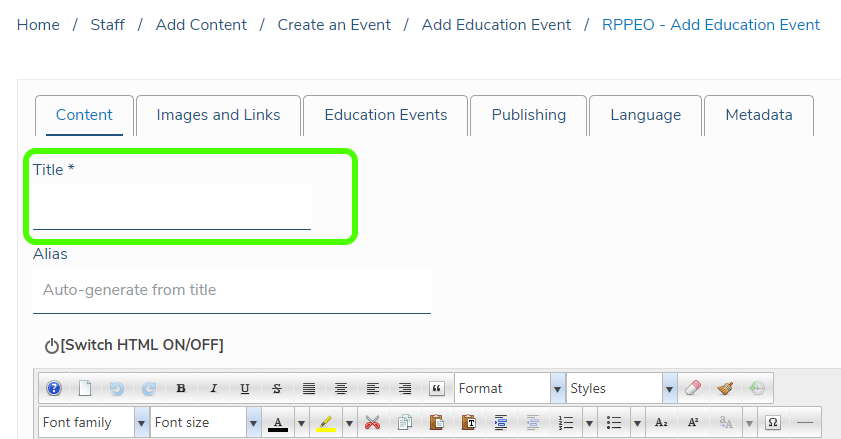
    To create a new Education Event you will need to create a new "Article". This is accomplished by clicking the menu link Staff > Create an Event > Add an Education Event.

    When this page opens you will see the Jomla Editor window. (shown)

    Enter the title for the Event on this page.

    Create New Education Event

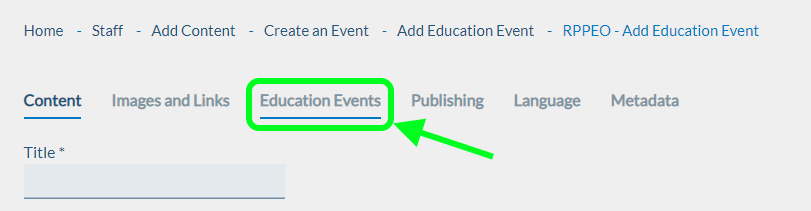
  • The Education Event tab

    After you enter the title, click the Education Events tab to enter the information about the event.

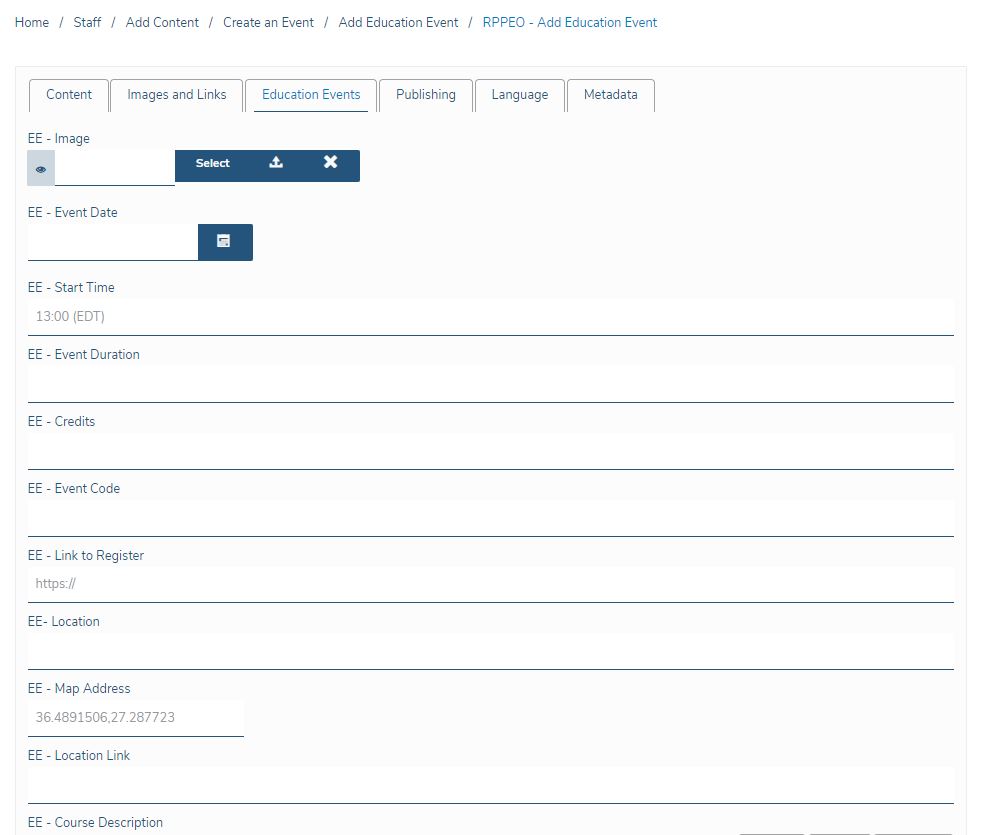
  • Fill in the Education Event Form

    The tab Education Events contains the form you will fill in with the various required data fields already laid out for you.

    First you will be asked to provide an Image. This image should be a minimum of 800 x 400 pixels. It is best to use a JPG format as they tend to be a significantly smaller file size compared to PNG. Most of our users are accessing this content using wifi or a data plan. 

    When you have entered all of the relevant information click save. The start date is used to sort the Events on the RPPEO Homepage

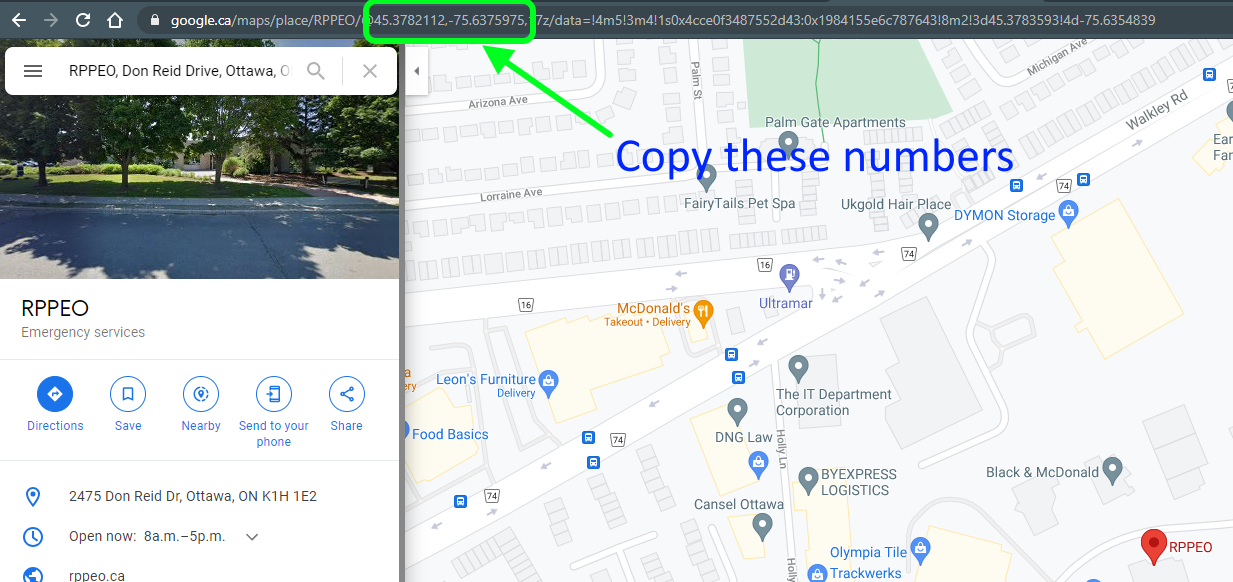
  • Add the Map location

    To display a map for users to see where the event is being hosted we need to go to Google Maps to get the co-ordinates. 

    As shown in the image to the right, use Google Maps to find the location, then copy the co-ordinates to the form.

    Please refer to the image for details.

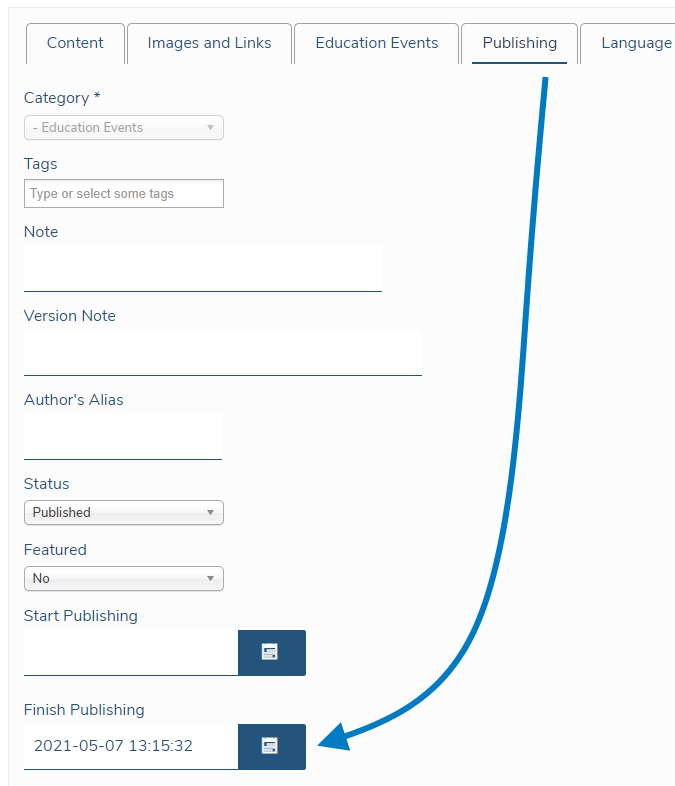
  • Set to expire automatically

    To have this event automatically removed from the list of events click the Publishing Tab. You can select a date in the future to start displaying the Event, and a date for the event to expire (Finished Publishing). When the date set is reached, the Event is Archived. It will only be visible to RPPEO Staff.

Read more …Create an Event

  • Hits: 2971